Introducing Overline
Generate a browser workflow using an LLM, then run it anytime from a command palette or keyboard shortcut. Fully local, BYOK.

Intro
Overline is a Chromium extension for AI-assisted browser macros. You describe an intent, demonstrate the workflow once, and Overline compiles a reusable script you can replay from ⌘⇧P / Ctrl⇧P.
Recording uses your own LLM key. Playback is deterministic and does not call models.
Background
Some apps, like Linear or Visual Studio Code, are incredibly nice to use. As a power user, one of my favorite features is the deeply integrated keyboard shortcuts. I can open a file, search for an issue, or navigate to a line number all in a few keystrokes.
But, obviously, most apps don’t have this kind of user experience. Most tools are designed for the mouse, and many common workflows involve clicking through a series of menus and buttons. If you’re just using those tools once in a while, it’s not a big deal. But if you, like me, spend hours a day working with a tool, having to switch from keyboard mode to mouse mode might cause you to lose your flow state. Every time I push code from my local branch to the remote repository, I like to review the diff on GitHub (yes, I still read code) but the diff viewer is not very keyboard-friendly. I scroll with my keyboard but have to switch to my mouse to mark a file as viewed. Every time I make and push new changes, I need to click the refresh button that pops up (since ⌘R makes the whole page reload). And then, finally, once I’m done reviewing all the files and marking each one as viewed, I click to go back to the conversation tab, click “Squash and merge”, and then “Confirm merge”. Even though these take just a few extra seconds, they add up when you’re doing it a dozen times a day, every day of the week.
I wanted to be able to use keyboard shortcuts - ⌘⇧V to mark a file as viewed, ⌘⌥R to refresh the code on new commits, ⌘⇧M to merge a pull request, and so on.
Overline was born out of this desire: not just for GitHub, but for any tool across the web. It acts as a layer on top of the web apps you use, allowing you to generate “macros” using an LLM, and running them anytime from a command palette or keyboard shortcut.
How it works
You give an intent (e.g. “go back to the PR conversation tab and merge it into main”). Overline determines how to execute that workflow once with the LLM, then compiles a reusable script. The flow below shows how this works.
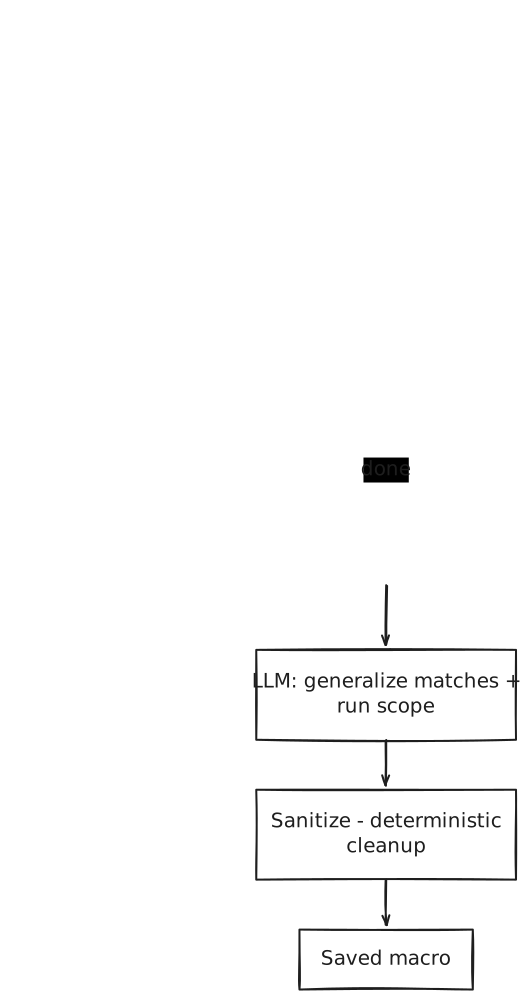
- Record: The LLM takes a series of turns from the live DOM and intent. Instead of feeding the entire DOM to the LLM (which can be infeasible to fit into the context window on large pages), the LLM is given tools to query through an index of interactive elements, including buttons, links, inputs, and more. Matching is deterministic and forgiving across labels, visible text, placeholders, and hrefs, so exact button copy is not required. When search is too vague, it can also browse a small page of that index. The record step is complete once the LLM has determined that the desired end state has been reached.
- Compile: To turn the demo into a reusable script, we use another LLM pass. Recording alone is not enough since the demo is tied to one page in one state, with concrete selectors and URLs from that session. Compile gets the intent, the start and end URLs, and each recorded step with its grounded result: the
recordedMatchcaptured from the live DOM when that click or fill actually ran (labels, text, hrefs, etc.), alongside the page URL at that step. From that, it generalizes matches so the script still finds the right controls on later runs, and may rewrite pure link clicks into navigate steps scoped with path placeholders. It has been carefully tuned to not invent targets that were not in the demo, but issues may still arise (more on that soon).
Here’s what a compiled script looks like after that pass. It’s a short sequence of match-and-act steps you can edit, assign a shortcut to, or replay later:

- Sanitize: Compile is trusted to generalize, but it may still invent match fields that were never on the demo element. Sanitize walks each compiled step against that step’s
recordedMatchand drops anything that was not present on (or a valid generalization of) the demo capture (for example, an unstable framework-generatedidlikeuseIdin React). It also applies some structural cleanup, like conflicting href strategies, unresolved path placeholders in click matches, and invalid navigate steps that get folded back into clicks.
Playback
Playback is separate from recording and compilation, and does not call any models. The saved script matches elements against the live DOM and performs each action with timing waits. You can run a macro from the command palette (⌘⇧P / Ctrl⇧P) or via a keyboard shortcut.
If the intent marks a value you’ll provide each run (e.g., a PR number or search term), Overline will turn that into a parameter. Playback prompts for it instead of baking the demo literal into the script.
Saved macros live in the options page, with run scope, shortcuts, and the compiled script for each one:

Usage
Overline is a Chromium extension. It is currently in review with the Chrome Web Store.
Since it is open source (at reybahl/overline), you can load it locally from the source code (instructions in the README). You will need an LLM API key to use it.
I would really love to get any feedback! If there are sites Overline does not work well on, please file an issue on GitHub.